Buyer's Guide
Building a GSPro Simulator: What It Actually Costs
Three complete home builds at $2,000, $5,000, and $10,000: launch monitor, hitting area, display, and the PC to run it. Real prices, including the subscriptions that don't show up on the sticker.
Updated July 2026
Affiliate disclosure: This article contains affiliate links to retailers. If you purchase through them we may earn a small commission at no extra cost to you. We only recommend gear we'd use ourselves, and picks are not influenced by commission rate.
My setup
My own bay is built around a Uneekor EYE Mini Lite I've run for over a year, a mid-to-premium build in the terms below. Most of what follows comes from putting that room together, getting parts of it wrong the first time, and watching what other GSPro players regret buying.
The short answer
A working GSPro setup needs five things: a launch monitor, somewhere safe to hit (net or enclosure), a mat, a display (TV or projector plus screen), and a PC. The launch monitor decides most of your budget. Everything else scales around it.
| Build | Launch monitor | Hitting area | Display | All-in |
|---|---|---|---|---|
| Starter | Garmin R10 (~$500) | Net + basic mat | TV you own | ~$1,500-2,200 |
| Sweet spot | Mevo Gen2 ($1,299) | Enclosure + screen | Projector | ~$4,500-5,500 |
| Forever bay | EYE Mini Lite (~$2,749) | Full enclosure + premium mat | 4K projector | ~$9,000-11,000 |
Every build also pays GSPro's own license, $250/year. Some monitors add a second subscription on top, covered per tier below and in detail in the launch monitor buyer's guide.
The starter build (~$2,000)
Starter build
Find out if sim golf sticks
~$2,000
The goal here is finding out whether sim golf sticks before real money goes in.
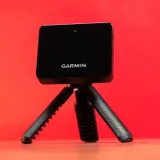
~$500
Pairs with GSPro over Bluetooth with no subscription. The cheapest real way in, and it holds resale value if sim golf doesn't stick.
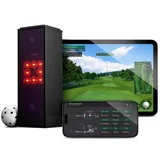
$699
The swap if your room is under about 15 feet deep. Camera-based, so it doesn't need the space radar does.
- Practice net (Amazon) (~$150-300): a quality net stops a screaming driver, cheap ones eventually don't. Don't go bargain-bin on the thing between your ball and the drywall.
- Hitting mat (Amazon) (~$150-250): a basic mat is fine at this tier, but skip the doormat-thin ones. Your wrists will notice after a hundred balls.
- Display: the TV or monitor you already own, off to the side. GSPro on a 55" TV is genuinely fine.
- PC: any machine with a mid-range gaming GPU runs GSPro at 1080p. An RTX 3060-class card and 16GB RAM is the comfortable floor, and used or refurbished gaming desktops in the $600-800 range clear it.
All-in with the GSPro license: roughly $1,500-2,200 depending on how much you already own. The R10 holds resale value, so the exit cost of this experiment is small. To trim it further, used R10s (eBay) sell well below retail, and there's no subscription attached to go stale.
The sweet spot (~$5,000)
Sweet spot
The most build for the money
~$5,000
This is the most build for the money, and where the projector-and-screen experience comes in: the difference between playing golf and watching a trace on a TV.
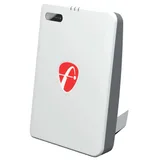
$1,299
The anchor of this tier: no GSPro subscription, accurate radar tracking, and enough headroom that you won't outgrow it fast.
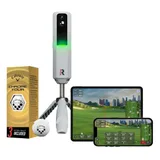
$699
Cheaper up front, but it adds a $199.99/year membership after the first year, so the Mevo wins the five-year math.
- Enclosure with impact screen (Amazon) (~$1,000-1,500): an enclosure kit with side netting keeps shanks in the bay and gives the projector a proper surface. Indoor Golf Outlet's enclosures run 5% off with code COURSEVIEW5.
- Short-throw projector (Amazon) (~$700-1,200): short-throw matters because it fills the screen from a few feet back, so your body isn't in the beam at address.
- Mid-tier hitting mat (Amazon) (~$300-500): at this tier you're hitting hundreds of balls a week off it. This is the upgrade people say they should have made sooner.
- PC: ~$1,000-1,300 gets a current mid-range gaming desktop that runs GSPro at high settings, 1080p or 1440p.
Radar needs room. Plan on 15+ feet of total depth so the Mevo can sit behind you and still see ball flight. Ceiling height of 9 feet is workable for most swings; 10 is comfortable.
Buying the pieces separately is how you get the best price on each one. If you'd rather not source five things, PlayBetter's SimStudio packages ship the enclosure, screen, mat, and projector matched around a launch monitor, so the sizing is already worked out. The tradeoff is that you take their component picks instead of your own.
The one rule that saves money
Spend on the launch monitor, save on everything else. The mat, screen, projector, and PC are all easy to upgrade one at a time later. Swapping a launch monitor means relearning your numbers, so it's the single piece worth stretching for on day one.
The forever bay (~$10,000)
Forever bay
No compromises left in the room
~$10,000
At this tier the launch monitor stops being the compromise. The launch monitor buyer's guide runs the full five-year comparison.
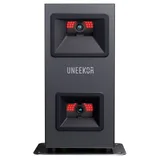
~$2,749
The one I own. Camera-based, reads the ball off its dimples, and fits a bay with no ceiling-mount build-out. Add Uneekor's $199/year Pro tier for GSPro access.
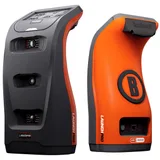
$3,499
The other route to camera-grade accuracy, but GSPro access needs the $499/year Gold plan, which changes the long-run math.
- Full enclosure (Amazon) (~$2,000-2,500): sealed sides, a tensioned impact screen, and no light bleed. This is what makes the room feel like a sim bay instead of a garage with a net. Indoor Golf Outlet's enclosure packages take the same COURSEVIEW5 code.
- 4K short-throw projector (Amazon) (~$1,500-2,000): GSPro's courses hold up at 4K, and on a 10-foot screen the difference from 1080p is not subtle.
- Premium hitting mat (Amazon) (~$500-800): the kind that takes a real divot swing without punishing your joints.
- PC: ~$1,500-2,000 for an RTX 4070-class machine that holds 60fps at 4K. GSPro doesn't support DLSS or frame generation, so the GPU does all the work honestly.
All-in lands around $9,000-11,000. It sounds like a lot until you price a country club membership, which is exactly the comparison most people at this tier are making.
The bundled route exists at this tier too. PlayBetter's SimStudio packages cover the enclosure, screen, mats, and projector in one purchase, which is worth a look if the room is the part you don't want to figure out. The packages are built around their own launch monitor options, so check that the one you want is among them before ordering.
The costs people forget
- Buying used cuts every tier. Launch monitors hold their accuracy for years and sim golfers upgrade constantly. The buying-used rundown in the launch monitor guide covers which units are safe used buys and what to check.
- GSPro's license: $250/year, every build, no way around it.
- Hardware subscriptions: Uneekor Pro $199/year, Bushnell Gold $499/year, Rapsodo Premium $199.99/year after year one. The Mevo Gen2, Square Golf, and Garmin R10 add nothing.
- Balls: some camera units read spin best off specific balls (Callaway RPT for the MLM2PRO, dotted balls for Square Golf). Budget a few dozen.
- Room prep: lighting, outlet placement, and something on the floor behind the mat. It rarely runs more than a couple hundred dollars, but nobody puts it in the budget.
Where to start playing
Once the room works, the software side is the easy part. GSPro's community library has thousands of courses. Start with the best GSPro courses guide, check the recommended settings for your launch monitor, and if you're building around a tournament you watched, the tour schedule shows which venues have GSPro versions.
Frequently asked questions
Can I build a GSPro simulator for under $1,000?
Yes, if you already own a gaming PC and a TV. A used Garmin R10 (~$400), a basic net and mat (~$300), and the GSPro license ($250/year) gets you playing. It's the “find out if you love it” build, not the destination.
How much room do I need?
Ceiling height is the hard constraint: 9 feet works for most swings, 10 is comfortable. Radar units (R10, Mevo) want 15+ feet of total depth; camera units (Square Golf, EYE Mini Lite, Launch Pro) work in much shallower rooms. Width-wise, 12 feet lets both left- and right-handed players hit from center.
What PC do I need for GSPro?
For 1080p, an RTX 3060-class GPU, a recent i5 or Ryzen 5, and 16GB RAM run GSPro smoothly. For 4K on a projector, step up to an RTX 4070 class. GSPro doesn't support DLSS or frame generation, so raw GPU power is what counts.
Projector or TV?
TV to start, projector when you commit. A TV beside the net costs nothing if you own one and works fine. Hitting into an impact screen with the course projected life-size is the version that makes people cancel their range memberships. But it needs the enclosure, so it belongs in the $5K build, not the starter.
Pick your launch monitor first
The full comparison of every GSPro-compatible unit, with five-year costs.
Launch monitor buyer's guide